Mostrando postagens com marcador application server. Mostrar todas as postagens

domingo, 23 de agosto de 2015

SCD4J v0.7.5

We are proud to announce a new SCD4J release (v0.7.5)

This version includes:
  •  The latest version of gradle (2.6)
  •  Improvements for non console runs 
  •  Other minor stuff
Besides that, we have published a new article (in Portuguese only, sorry folks) about how to install a cluster of wildfly.  

domingo, 11 de agosto de 2013

Running Websockets on OpenShift


WebSocket is a pretty new and important technology in which it is possible to send message frames from server to clients without opening multiple HTTP connections. Although it is has been proven to be a solid and consolidated specification, running websockets in the existing cloud platforms is still a pain in the ass. The main cloud players do not provide enough support for WebSocket protocol due to the lack of application servers’ readiness and due to other issues related to the routing layer.

Knowing those difficulties, I’ve decide to post the steps to help eager people to use Red Hat OpenShift PaaS to run a websocket apps in the cloud. So, let's start from the beginning.


  • First of all, you must sign up in the OpenShift web site
  • Then you must add a new application
    • Pick Do-It-Yourself (DIY) cartridge
      • This will allow you to use a “pure Linux server” to do whatever you would like to do. In the specific case of this post, we are going to install an embedded web application in order to provide the required support for websockets.
    • Once DIY cartridge have been selected, you must fill out the application name and click on ‘Create Application’ button
    • Finally, do a ‘git clone’ according instructions

At this point, we have already prepared our Linux server on the cloud to install our application according our needs. Now, let’s make the required changes in the working copy we have just cloned from OpenShift master repository.

The changes are:
  • Update the shell script file which will be used by OpenShift to start our app
    • File: .openshift/action_hoooks/start 
    • Content: 

#!/bin/bash
# The logic to start up your application should be put in this
# script. The application will work only if it binds to
# $OPENSHIFT_DIY_IP:8080


echo "Starting WebSocketExample............. $OPENSHIFT_DIY_IP:$OPENSHIFT_DIY_PORT"
nohup java -jar $OPENSHIFT_REPO_DIR/diy/WebSocketExample.war > $OPENSHIFT_DIY_DIR/logs/server.log 2>&1 &
echo "Started WebSocketExample............. $OPENSHIFT_DIY_IP:$OPENSHIFT_DIY_PORT"
  • Update the shell script file which will be used by OpenShift to stop your app
    • File: .openshift/action_hoooks/stop 
    • Content:

#!/bin/bash
source $OPENSHIFT_CARTRIDGE_SDK_BASH


echo "Stopping WebSocketExample............."
if [ -z "$(ps -ef | grep WebSocketExample.war | grep -v grep)" ]
then
   client_result "WebSocketExample Application is already stopped"
else
echo "Killing WebSocketExample............."
   kill `ps -ef | grep WebSocketExample.war | grep -v grep | awk '{ print $2 }'` > /dev/null 2>&1
fi
echo "Stopped WebSocketExample............."
  • Add the embedded jetty application in the ‘Do It Yourself’ directory
    • Directory: diy
      • In this example, we have used the ‘WebSocketExample.war’ app name in order to match out our start/stop scripts.
      • Important note about the embedded jetty application file: 
        • There are some peculiaridades in the implementation of the class com.embedded.JettyStarter (shown below in red) which must be changed in order to bind the embedded app to the right IP and PORT number in the OpenShift platform. 
        • Content:

public class JettyStarter {
       public static void main(String[] args) throws Exception{
               ProtectionDomain domain = JettyStarter.class.getProtectionDomain();
               URL location = domain.getCodeSource().getLocation();
       
               // create a web app and configure it to the root context of the server
               WebAppContext webapp = new WebAppContext();
               webapp.setDescriptor("WEB-INF/web.xml");
               webapp.setConfigurations(new Configuration[]{ new AnnotationConfiguration()
        , new WebXmlConfiguration(), new WebInfConfiguration(), new MetaInfConfiguration()        
        //, new FragmentConfiguration(), new EnvConfiguration(), new PlusConfiguration()
                });
               webapp.setContextPath("/");
               webapp.setWar(location.toExternalForm());
       
               // starts the embedded server and bind it to openshift variables        
               String host = System.getenv("OPENSHIFT_DIY_IP");
               String port = System.getenv("OPENSHIFT_DIY_PORT");
               System.out.println(host + ":" + port);
               InetSocketAddress sa = new InetSocketAddress(getByName(host), valueOf(port));
               Server server = new Server(sa);


               server.setHandler(webapp);        
               server.start();
               server.join();
       }
}

After script files have been configured and the embedded application has been put in the ‘diy’ directory, you must commit and push changes back to the master repository.
  • The commands are:
    • git commit -m 'My changes'
    • git push
  • As soon as the push finishes, the stop/start scripts will run
    • If you notice it didn’t run accordingly, remote access your openshift server and check if everything is ok. Remember: it is Red Hat Linux, so you should be ok checking your stuff.
    • Try to check if start/stop scripts have execution permission (not sure why, but I have this issue in some experiments).
      • ls -lt $OPENSHIFT_REPO_DIR/.openshift/action_hooks/
    Finally, are done. \o/
      Access 'ws://[YOUR APP].rhcloud.com:8000/example' using your favorite WebSocket tool and check it by yourself.
        Don't have a WebSocket tool?  Take a look on ‘Advanced REST client’ for Chrome

        The openshift configuration used in this example can be found here.
          Thanks for reading


          domingo, 14 de julho de 2013

          Fixing Run-Jetty-Run Eclipse Plugin to Run Websockets


          Run-Jetty-Run is an Eclipse plugin for running and debugging web apps using Jetty container. Although it has been a great and useful tool in the past days, lately, when I was playing around with websockets, I’ve found it was not working properly as it should.


          It is important to say that the current stable build of Run-Jetty-Run plugin does not support the latest Jetty version (i.e. 9.0.4), so it became necessary to get its nightly build. Once I downloaded it, I've noticed it was not up-to-date either. Actually the last nightly build is pretty old too (the build date is 01/02/2013) and, unfortunately, it only supports Jetty 9.0.0.M3.


          So, If you are facing the below issue or if you are a curious person, I would suggest you to keep reading.


          java.util.ServiceConfigurationError: org.eclipse.jetty.websocket.servlet.WebSocketServletFactory: Provider org.eclipse.jetty.websocket.server.WebSocketServerFactory not found
          at java.util.ServiceLoader.fail(ServiceLoader.java:231)
          at java.util.ServiceLoader.access$300(ServiceLoader.java:181)
          at java.util.ServiceLoader$LazyIterator.next(ServiceLoader.java:365)
          at java.util.ServiceLoader$1.next(ServiceLoader.java:445)
          at org.eclipse.jetty.websocket.servlet.WebSocketServlet.init(WebSocketServlet.java:136)
          at javax.servlet.GenericServlet.init(GenericServlet.java:242)
          at org.eclipse.jetty.servlet.ServletHolder.initServlet(ServletHolder.java:516)
          at org.eclipse.jetty.servlet.ServletHolder.getServlet(ServletHolder.java:398)
          at org.eclipse.jetty.servlet.ServletHolder.handle(ServletHolder.java:642)
          at org.eclipse.jetty.servlet.ServletHandler.doHandle(ServletHandler.java:445)
          at org.eclipse.jetty.server.handler.ScopedHandler.handle(ScopedHandler.java:138)
          at org.eclipse.jetty.security.SecurityHandler.handle(SecurityHandler.java:564)
          at org.eclipse.jetty.server.session.SessionHandler.doHandle(SessionHandler.java:213)
          at org.eclipse.jetty.server.handler.ContextHandler.doHandle(ContextHandler.java:1054)
          at org.eclipse.jetty.servlet.ServletHandler.doScope(ServletHandler.java:372)
          at org.eclipse.jetty.server.session.SessionHandler.doScope(SessionHandler.java:175)
          at org.eclipse.jetty.server.handler.ContextHandler.doScope(ContextHandler.java:988)
          at org.eclipse.jetty.server.handler.ScopedHandler.handle(ScopedHandler.java:136)
          at org.eclipse.jetty.server.handler.HandlerWrapper.handle(HandlerWrapper.java:97)
          at org.eclipse.jetty.server.Server.handle(Server.java:410)
          at org.eclipse.jetty.server.HttpChannel.run(HttpChannel.java:245)
          at org.eclipse.jetty.server.HttpConnection$1.run(HttpConnection.java:75)
          at org.eclipse.jetty.util.thread.QueuedThreadPool.runJob(QueuedThreadPool.java:597)
          at org.eclipse.jetty.util.thread.QueuedThreadPool$3.run(QueuedThreadPool.java:528)
          at java.lang.Thread.run(Thread.java:722)


          Once the Run-Jetty-Run team seems to not be working anymore and since there were some changes in the internal Jetty API, I’ve decided to fix it by myself and to post the result to make life simple for everyone trying to run websockets into Eclipse.


          It is important to say that this fix was tested only in the Eclipse Kepler. So, in order to avoid other issues, ensure you have the latest version of Kepler IDE. After that, you can follow the following steps:


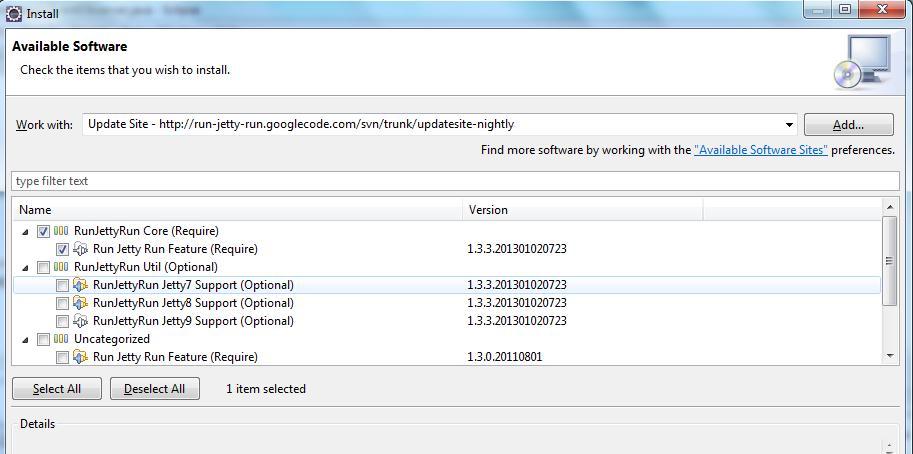
          1. First of all, you must install the core of the Run-Jetty-Run plugin.
            1. For that, go to Help -> Install New Software.
            2. Then, enter the http://run-jetty-run.googlecode.com/svn/trunk/updatesite-nightly URL and install the Run Jetty Run Feature (Required)
          2. Once the core plugin has being installed, you must install my customized support for running Jetty 9.0.4.
            1. Copy the downloaded jar into the /<YOU_ECLIPSE_KEPLER_HOME>/plugins
            2. And, restart the eclipse
          3. Finally, right click on your websocket app and choose RunAs -> Run Jetty
            1. In Jetty tab, select the following Jetty Version: Jetty 9.0.4.by.Rubbo
            2. In Jetty Classpath tab, add your project in the Custom Jetty Classpath
              1. It is important to say that this step is only necessary because there is another bug in the core plugin which I didn’t want to lose my time to fix.
            3. So, we are done!!
              1. Click in the Run button and have fun..


          Hope I’ve helped to make your life simple. ;-)

          Thanks for reading.

          terça-feira, 21 de maio de 2013

          JBoss EAP 6.1.0 is out


          * For advantages and disadvantages of JBoss 7 (JBoss EAP 6) read Jboss 7: a love–hate relationship. *

          The new version of JBoss EAP 6.1 was released yesterday (05/20/2013 10:08) and it includes lots of bug fixes and the following new features:

          • Global Valves in JBoss Web
            • JBoss Enterprise Application Platform 5 offered the capability to configure a global valve for the web container. In 6.0 it was only possible to configure a valve on a single application basis. For JBoss Enterprise Application Platform 6.1 the global valve capability has been restored.
          • Improved Initial Context options for EJB Clients
            • JBoss Enterprise Application Platform 6.1 provides a method to configure an InitialContext with a Map and create an EjbClientContext scoped to this particular InitialContext. The method also enables this configuration without dependencies on JBoss specific classes.
          • Passing Additional Information to the Authorization Module
            • In JBoss Enterprise Application Platform 6.0 it was not possible to pass additional information to the authorization module, as Java EE Interceptors were not called until after the container interceptors, including the login module, were called. JBoss Enterprise Application Platform 6.1 has added the capability to inject Java EE Interceptors into the container interceptor chain.
          • Security Context Propagation and User Switching
            • JBoss Enterprise Application Platform 6.1 is providing Quickstarts to demonstrate to following capabilities:
              • ejb-security-interceptors - Demonstrates how interceptors can be used to switch the identity for EJB calls on a call by call basis.
              • ejb-security-interceptors - Demonstrates how Interceptors can now be injected into the server's interceptor chain to propagate security contexts from one EJB to another, and switch users of an EJB.
          • Enhanced System Property Substitution
            • JBoss Enterprise Application Platform 6.0.0 included property substitution as a capability of the attributes of the configuration, but the number of properties that were supported was limited. For JBoss Enterprise Application Platform 6.1 the number of attributes enabled for substitution has increased.
          • Deterministic Column Names with Hibernate
            • In earlier versions Hibernate was not using a deterministic algorithm to generate column aliases, limiting the benefit derived from the database cache. Aliases are now consistently named.

          The most expected feature is the container interceptor. Please, see community docs for more details https://docs.jboss.org/author/display/AS72/Container+interceptors.

          Here is JBoss EAP 6 component matrix :

          ComponentEAP 6.0.0EAP 6.0.1EAP 6.1.0
          JBoss AS7.1.2 Final7.1.3 Final7.2.0 Final
          WELD1.1.8.Final1.1.10.Final1.1.13.Final
          Rest Easy2.3.3.Final2.3.4.Final2.3.6.Final
          mod_cluster1.2.1.Final1.2.3.Final1.2.4.Final
          Picketlink Federation2.1.1.Final2.1.3.Final2.1.6.Final
          JBoss Modules1.1.2.Final1.1.3.Final1.2.0.Final
          JBoss DMR1.1.1.Final1.1.1.Final1.1.6.Final
          JBoss Metadata7.0.3.Final7.0.4.Final7.0.8.Final
          JBoss XNIO3.0.4.GA3.0.7.GA3.0.7.GA
          PicketBox4.0.9.Final4.0.14.Final4.0.17.Final
          PicketBox Commons1.0.0.Final1.0.0.Final1.1.0.Final
          Hibernate Core4.1.3.Final4.1.6.Final4.2.0.Final
          Hibernate Infinispan (2LC)4.1.3.Final4.1.6.Final4.2.0.Final
          Hibernate Envers4.1.3.Final4.1.6.Final4.2.0.Final
          Hibernate Validator4.2.0.Final4.2.0.Final4.3.1.Final
          Hibernate JPA 2.0 API1.0.1.Final1.0.1.Final1.0.1.Final
          JBoss Web7.0.16.Final7.0.17.Final7.2.0.Final
          Infinispan5.1.4.Final5.1.8.Final5.2.6.Final
          IronJacamar (JCA 1.6)1.0.11.Final1.0.13.Final1.0.17.Final
          JGroups3.0.9.Final3.0.14.Final3.2.7.Final
          JBoss Transactions4.16.4.Final4.16.6.Final4.17.4.Final
          JBoss EJB Client1.0.10.Final1.0.11.Final1.0.21.Final
          JBoss EJB3 EXT API2.0.02.0.02.0.0
          JBoss WS API1.0.0.GA1.0.0.GA1.0.0.GA
          JBoss WS SPI2.0.3.GA2.0.4.GA2.1.2.Final
          JBoss WS Common2.0.4.GA2.0.4.GA2.1.1.Final
          JBoss WS Common Tools1.0.1.GA1.0.2.GA1.1.0.Final
          JBoss WS-CXF4.0.4.GA4.0.6.GA4.1.3.Final
          JBoss WS-Native (for jaxrpc only)4.0.4.GA4.0.6.GA4.1.1.Final
          JBoss VFS3.1.0.Final3.1.0.Final3.1.0.Final
          JBoss Remoting33.2.8.GA3.2.14.GA3.2.16.GA
          JBoss Marshalling1.3.14.GA1.3.15.GA1.3.16.GA
          JBoss SASL1.0.1.Final1.0.3.Final1.0.3.Final
          JSF1.2_15-b01-redhat-11.2_15-b01-redhat-21.2_15-b01-redhat-3
          JSF22.1.7-redhat-12.1.13-redhat-12.1.19-redhat-1
          JacORB2.3.2-redhat-12.3.2-redhat-22.3.2-redhat-4
          JBoss Security Negotiation2.2.0.SP12.2.1.Final2.2.5.Final
          JBoss Management Console1.3.1.Final1.4.2.Final1.5.2.Final
          HornetQ2.2.16.Final2.2.23.Final2.3.1.Final
          Netty (in HornetQ and Inifnispan)3.2.6.Final3.2.6.Final3.6.2.Final
          JBoss Logging3.1.1.GA3.1.2.GA3.1.2.GA
          Apache CXF2.4.6-redhat-12.4.9-redhat-22.6.6-redhat-3
          Apache CXF XJC-Utils2.4.0-redhat-12.4.0-redhat-22.6.0-redhat-1
          Apache WSS4J (for WS)1.6.51.6.71.6.9
          Xalan2.7.1-redhat-12.7.1-redhat-32.7.1-redhat-4
          Xerces2.9.1-redhat-12.9.1-redhat-32.9.1-redhat-4
          JAXB2.2.52.2.5-redhat-32.2.5-redhat-5
          Application Platform 6.0.0 Apache Web Serverbased on Apache 2.2.17based on Apache 2.2.22based on Apache 2.2.22